
 Sudhir Singh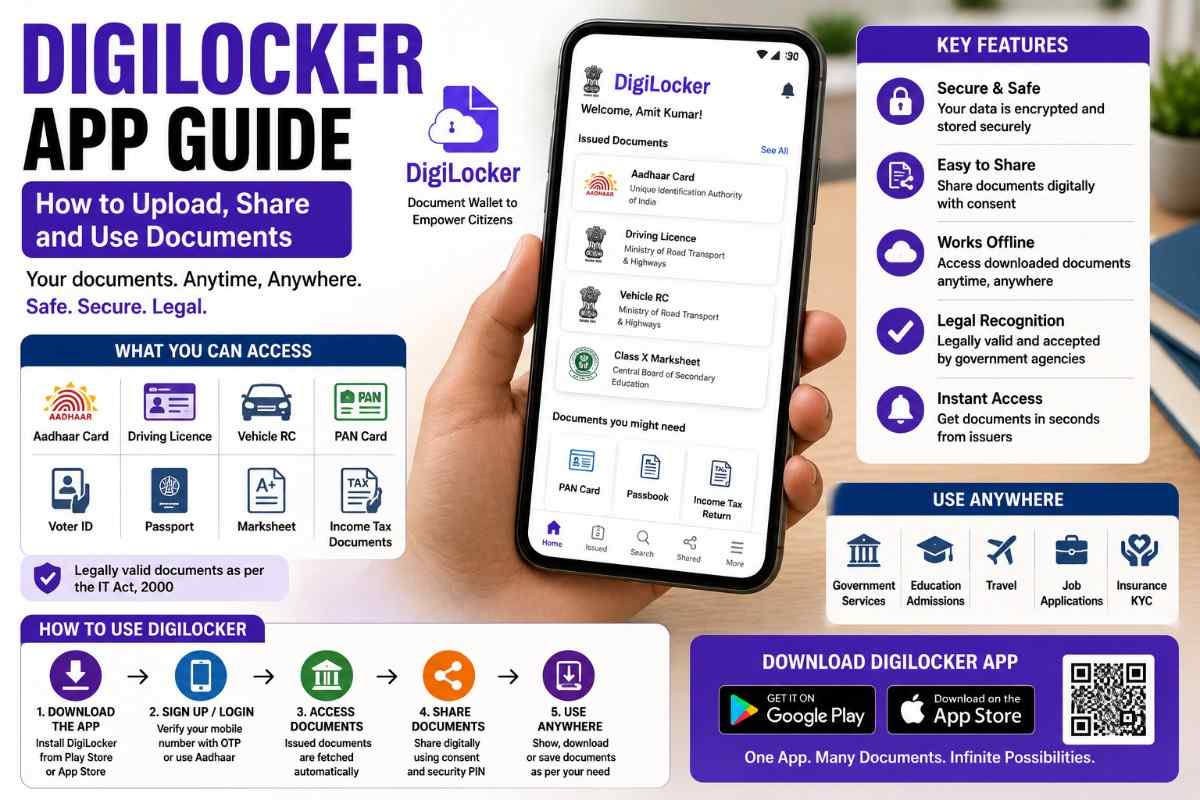
Updated on June 19, 2026
DigiLocker is a free government-backed app that stores your important documents digitally. Once linked to your Aadhaar, it pulls documents directly from government databases: your driving licence, vehicle RC, PAN card, Aadhaar, board marksheets, vaccination certificates, and more. These digital documents are legally valid under the IT Act and accepted everywhere official documents are accepted.
If you have been carrying a wallet full of photocopies, DigiLocker removes that need entirely.
Download DigiLocker
- Android: Search “DigiLocker” on the Google Play Store. The official app is published by the National e-Governance Division (NeGD).
- iPhone: Available on the Apple App Store, same publisher.
- Web: digilocker.gov.in works on any browser without downloading anything.
The app is free. No hidden charges for any feature.
How to Create a DigiLocker Account
- Open the DigiLocker app or visit digilocker.gov.in.
- Tap “Sign Up”.
- Enter your mobile number. An OTP is sent to your phone.
- Enter the OTP and set a 6-digit security PIN.
- Enter your Aadhaar number to link your account. Verify with another OTP sent to your Aadhaar-registered mobile number.
- Your account is ready. DigiLocker immediately populates your Aadhaar-based documents from government databases.
You can also sign up with just a mobile number without Aadhaar, but many documents will not be available until Aadhaar is linked.
Documents Available in DigiLocker (From Government Databases)
These documents are fetched automatically from the issuing authority. You do not upload them manually.
| Document | Issuing Authority |
|---|---|
| Aadhaar Card | UIDAI |
| PAN Card | Income Tax Department |
| Driving Licence | Ministry of Road Transport (Sarathi) |
| Vehicle Registration Certificate (RC) | Ministry of Road Transport (Vahan) |
| CBSE Marksheets and Certificates | CBSE |
| COVID-19 Vaccination Certificate | CoWIN |
| ABHA Health Card | National Health Authority |
| Insurance Policy Documents | Selected insurers |
| ITR Acknowledgement | Income Tax Department |
Go to “Issued Documents” in the app to see and fetch these. Tap any category, enter your details, and the document appears in your locker.
How to Upload Your Own Documents
If you have documents that are not issued digitally by the government, you can upload scanned copies yourself. These are stored in the “Uploaded Documents” section.
- Tap the “+” button or “Upload Document” in the app.
- Choose a document type from the list (property documents, medical records, educational certificates, etc.).
- Take a photo or upload from your phone gallery. PDF format is also accepted.
- Give it a name and save.
Uploaded documents have 1 GB of free storage. Note: uploaded documents do not carry the same legal weight as issuer-fetched documents. However, they are useful for keeping records in one place.
How to Share Documents from DigiLocker
Sharing a document takes about 10 seconds.
- Open the document you want to share.
- Tap the “Share” icon.
- Choose one of the options: share a link via WhatsApp, email, or any messaging app. The recipient gets a secure link to the verified document.
- For some documents (like the DL or RC), tap “Share” > “QR Code”. The traffic officer or accepting party scans the QR to view the authentic document.
Shared links expire after a set time for security. The recipient cannot download and modify the document since it links directly from the government database.
Using DigiLocker at Traffic Checkpoints
A digital driving licence and vehicle RC on DigiLocker are legally valid for traffic checks under the Motor Vehicles Act amendment of 2019. When stopped:
- Open DigiLocker and go to your Driving Licence under Issued Documents.
- Show the screen to the officer. They can also scan the QR code on the document to verify it against the Vahan/Sarathi database in real time.
- You do not need to carry physical copies if the digital version is available.
However, some state transport departments have specific local guidelines. Physical documents remain the safest backup during out-of-state travel.
DigiLocker Security Features
- The app locks after 3 wrong PIN attempts.
- Each login sends an OTP to your registered mobile number.
- Documents are stored on Government of India cloud servers, not on your phone.
- You can set a biometric lock (fingerprint or face unlock) for faster access.
Frequently Asked Questions
Is DigiLocker accepted for bank account opening and KYC?
Yes. RBI-regulated banks and financial institutions accept DigiLocker documents for paperless KYC. The Aadhaar and PAN available in DigiLocker meet the KYC requirements set by SEBI and RBI for most financial products.
My driving licence is not appearing in DigiLocker. What should I do?
Go to “Search Documents” and select “Driving Licence” under the Ministry of Road Transport. Enter your DL number and date of birth. If it still does not appear, your licence may not yet be digitised by your state’s RTO. Contact your RTO to confirm whether your DL is on the Sarathi portal.
Can I delete a document from DigiLocker?
You can delete uploaded documents at any time. Issuer-fetched documents (like Aadhaar or DL) cannot be deleted since they are pulled live from the government database each time you open them. They simply stop showing if you remove the document type from your locker, but the original data stays with the issuing authority.
What happens if I lose my phone?
Your documents are safe because they are stored on government servers, not on your phone. Log in from any new phone using your mobile number and PIN. Change your PIN immediately if you suspect your account is compromised. You can also block access temporarily by calling the DigiLocker helpline at 1800-3000-0977.
📩 If you notice any incorrect data in this guide or wish to share additional information, please write to us at info@indiansouls.in.
Over 2000+ Government Schemes & Policies Simplified
Indian Souls is your guide to government Schemes, scholarships, pensions, subsidies, job exams, and more. We break complex schemes into easy steps, helping every citizen take full advantage of the opportunities available.
No jargon. No confusion. Just useful info that helps indian citizen.



 Sudhir Singh










%202026%20Guide%20:%20The%20“No-Nonsense”%20Guide)
)


)
)
%20को%20ड्रोन%20खरीदने%20के%20लिए%20आर्थिक%20मदद)


)