Simple Guide to Using the EPFO UAN Member Portal (For Employees)

Updated on May 22, 2025

Summary

The EPFO UAN Member Portal allows employees to manage their Provident Fund (PF) account online using a Universal Account Number (UAN). Users can activate their UAN, check PF balance, download passbooks, update KYC details, file withdrawal or transfer claims, and track claim status.

To access the portal, one must activate their UAN using Aadhaar and a registered mobile number. Keeping KYC updated is essential for smooth transactions. The portal helps consolidate PF information even when changing jobs, making it a useful tool for managing retirement savings efficiently and securely.

So, you just got your first job (congrats! ), and someone from HR casually drops this line on you:

“Please activate your Universal Account Number on the EPFO portal to access your PF account.”

Your reaction? Probably something between panic and pretending to understand what they just said.

Don’t worry—we’ve all been there. And that’s exactly why this guide exists. If the official PDF confused you with technical words and screenshots from 2012, here’s the new version of how to use the UAN Member Portal to manage your EPF account.


First, What Even Is UAN?

Let’s break it down.

UAN = Universal Account Number.
It’s a unique 12-digit number given to you by the Employees’ Provident Fund Organisation (EPFO). Think of it as your personal ID for all things related to your Provident Fund (PF).

Even if you change jobs, your UAN stays the same—forever. New employers just link their own PF account to your UAN. So everything stays neat and in one place.


What Can You Do with the Universal Account Number Portal?

Once you log in, you can:

  • Check your PF balance
  • Download your passbook
  • Update your KYC (like Aadhaar, PAN, bank details)
  • File a claim
  • Track claim status
  • See how much your employer contributes
  • Download your UAN card

Basically, it’s your PF command center.

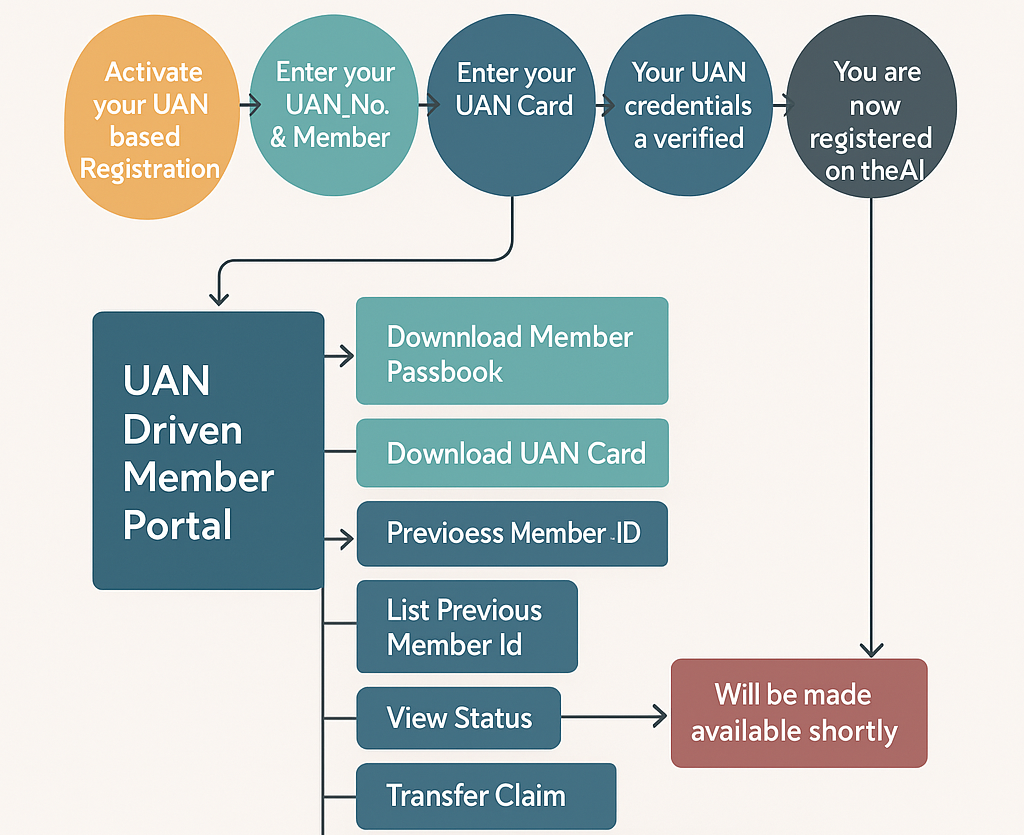
Here is the complete UAN Member Portal Complete Flow:
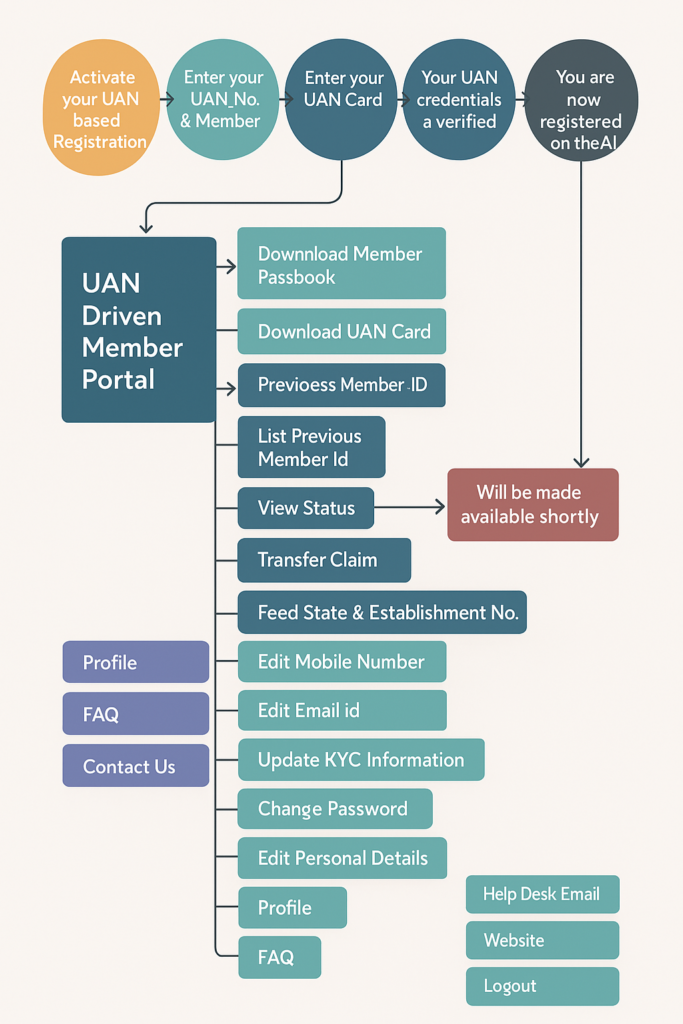
UAN stands for Universal Account Number

Step-by-Step: How to Use the UAN Member Portal

Alright, let’s get into the nitty-gritty—how to actually use this thing.


Step 1: Head Over to the Portal

Go to the official EPFO UAN Member Portal:
👉 https://unifiedportal-mem.epfindia.gov.in/memberinterface/

Bookmark it. This is where all the magic happens.


Step 2: Activate Your UAN (If You Haven’t Already)

Before you can log in, you need to activate your Universal Account Number. Here’s how:

  1. On the homepage, click ‘Activate UAN.
  2. Fill in your:
    • UAN (you’ll get this from your employer)
    • Name (exactly as per records)
    • Date of birth
    • Mobile number
    • Aadhaar/PAN/Member ID (any one)
  3. You’ll receive an OTP on your phone.
  4. Enter the OTP and submit.

Done. Your UAN is now activated.


Step 3: Logging In

Once activated:

  1. Go back to the homepage.
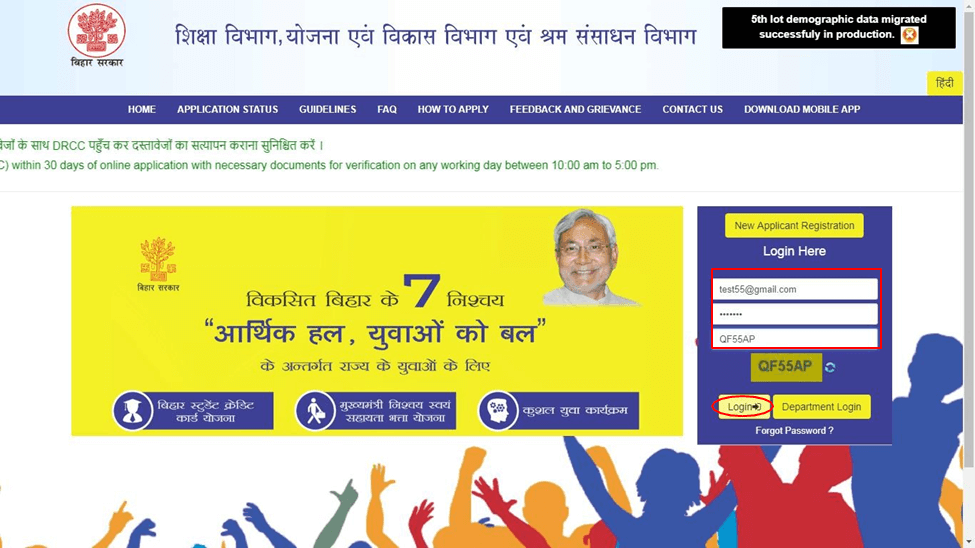
  2. Enter your UAN and the password you just created.
  3. Type the captcha (yes, those annoying squiggly letters), and hit Sign In.

Welcome to your PF world.


What’s Inside the Dashboard?

Here’s what you’ll see once you’re in:

1. View Section

  • Profile: Check your name, gender, date of birth, etc.
  • Service History: List of all employers linked to your UAN.
  • UAN Card: A downloadable ID card for your PF records.
  • Passbook: See monthly contributions and balances (redirects to another site).

2. Manage Section

  • Contact Details: Update mobile number and email.
  • KYC: Add/update Aadhaar, PAN, and bank account.
  • E-nomination: Add a nominee in case of any unfortunate event.

3. Online Services

  • Claim (Form 19, 10C, 31): Withdraw funds, request an advance, or pension.
  • Track Claim Status: See if your claim is processed or pending.
  • Transfer Request: If you changed jobs, transfer your old PF.

Everything is labelled and fairly simple if you take your time.


Forgot Your Password? Don’t Stress.

It happens. Here’s how to reset it:

  1. Click ‘Forgot Password?’ on the login page.
  2. Enter your Universal Account Number and verify with OTP on your registered mobile.
  3. Create a new password and log in again.

You’re back in.


KYC: Why It Matters

Your KYC (Know Your Customer) details—like Aadhaar, PAN, and bank info—are super important.

Without updated KYC:

  • You can’t make withdrawals
  • Claims might get rejected
  • Employer contributions may not show up correctly

To update KYC:

  1. Go to Manage > KYC
  2. Fill in details for Aadhaar, PAN, Bank, etc.
  3. Upload scanned documents
  4. Submit and wait for employer to approve

Once verified, the status will show “Approved by Employer.”


Common Issues People Face (And How to Fix Them)

  • Mobile number not linked?
    You’ll need to visit your employer or local EPFO office for help.
  • Mismatch in name or DOB?
    Go to the ‘Profile’ section and raise a request to correct details via the employer.
  • Is KYC stuck in pending?
    Remind your employer to approve it from their portal login.
  • Can’t log in at all?
    Double-check if your UAN is activated. If yes, reset the password.

Pro Tips to Make Your Life Easier

  • Always keep your mobile number updated. You’ll need it for OTPs.
  • Keep a copy of your UAN card for future job changes.
  • Download your passbook every few months to stay on top of your savings.
  • Don’t ignore e-nomination—you’d rather not leave your loved ones confused in an emergency.

In a Nutshell

FeatureWhat You Can Do
UAN ActivationStart using your PF account online
View PassbookCheck your savings and contributions
KYC UpdateLink Aadhaar, PAN, and bank account
File ClaimsWithdraw or transfer PF money
UAN CardDownload your unique PF identity

Final Thoughts

The EPFO Universal Account Number Member Portal may look a little dated, but it’s genuinely helpful once you know your way around it. Whether you’re just starting your career or planning your retirement in a few years, it pays (literally) to understand how to manage your Provident Fund online.

So don’t be afraid to click around, explore the portal, and make sure your future money is right where it should be—safe, growing, and accessible.

Need help with a specific step? I can walk you through it or even draft a message you can send to HR. Just let me know.

📩 If you notice any incorrect data in this guide or wish to share additional information, please write to us at info@indiansouls.in.

Over 2000+ Government Schemes & Policies Simplified

Indian Souls is your guide to government Schemes, scholarships, pensions, subsidies, job exams, and more. We break complex schemes into easy steps, helping every citizen take full advantage of the opportunities available.

📌 1.5M+ Readers Reached
📝 5K+ Queries Resolved
💡 1L+ Citizens Benefiting
📚 500+ Verified Scheme Guides
🎓 Scholarship Alerts & Exam Prep
🌍 Smart Travel & Subsidy Tips
Find Hidden Government Schemes!

No jargon. No confusion. Just useful info that helps indian citizen.

Simple Guide to Using the EPFO UAN Member Portal (For Employees) - Indian Souls
Sudhir Singh

As the Head of Strategy and Growth for Indian Souls, I lead the technical and editorial mission to bridge the gap between complex government policy and the everyday Indian citizen. With over 5 years of experience in digital architecture and performance marketing, I have dedicated my career to building high-impact platforms that simplify over 1500+ central and state government schemes, scholarships, and welfare initiatives for over 1.5 million readers. My background is a unique blend of technical engineering and strategic content leadership. As the founder of Notioncue.com, I specialize in the full lifecycle of digital products, from WordPress architecture and AI-integrated coding to advanced Server-Side Analytics (GA4/GTM). My work ensures that critical information is not just published, but accessible, fast, and optimized to reach the people who need it most. My Areas of Expertise Civic Tech & Content Strategy: Transforming dense regulatory frameworks into clear, actionable guides for farmers, students, and entrepreneurs. Full-Stack Web & App Development: Expert-level WordPress customization, app creation, and building scalable digital infrastructures. Advanced Data Analytics: Specialist in technical SEO, Webmaster Tools, and applied analytics (IIT Bombay methodology). Growth Engineering: Leading end-to-end digital marketing and inbound strategies for global brands across the US, India, and Saudi Arabian markets. Honors & Certifications Executive Program in Digital Marketing & Applied Analytics – IIT Bombay Certifications: Fact-Checking Fundamentals (IFCN), Content Marketing, Inbound Marketing, and Email Marketing (HubSpot Academy). Awards: Recipient of the Award for Professional Excellence and Rising Star for innovation in digital governance and content leadership.

More Government Schemes

Jan Dhan Yojana (PMJDY) – Account Opening, Balance and Benefits Complete Guide

Pradhan Mantri Jan Dhan Yojana offers zero-balance bank accounts with accident insurance, overdraft facility, and RuPay debit card. Eligibility, how to open online, and account benefits explained.

Post Office RD Scheme – Recurring Deposit Interest, Maturity and How to Open

Post Office Recurring Deposit (RD) lets you save a fixed amount monthly at 6.7% interest over 5 years. Learn current rates, how to open online, maturity calculation, and loan facility.

NPS National Pension System – How to Open an Account and Claim Tax Benefits

National Pension System (NPS) lets any Indian build a retirement corpus with market-linked returns. Learn how to open an NPS account online, tax benefits under 80CCD, and withdrawal rules.

Post Office Savings Schemes – All 9 Schemes Compared

Compare all 9 Post Office savings schemes: interest rates, tenure, tax benefits, and minimum deposit. Find which scheme suits your savings goal in 2026.

Cyber Crime Complaint Online – How to File on cybercrime.gov.in

File a cyber crime complaint online at cybercrime.gov.in or call the 1930 helpline immediately if you lose money to fraud. Step-by-step guide for financial fraud, OTP scams, and online harassment.

PM SVANidhi Scheme – Rs. 50,000 Loan for Street Vendors: Complete Guide

PM SVANidhi gives street vendors loans from Rs. 10,000 to Rs. 50,000 at subsidised interest. Check eligibility, how to apply, and how to get the next higher loan after repayment.

Post Office Fixed Deposit (TD) – Rates, How to Open and Benefits

Post Office Fixed Deposit (Time Deposit) offers up to 7.5% interest. Check current rates, how to open online or at a post office, 80C benefit, and premature withdrawal rules.

DigiLocker App Guide – How to Upload, Share and Use Documents

Complete DigiLocker guide: how to download the app, create account, access Aadhaar, driving licence, RC, marksheets, and share documents legally. Works offline too.

NPS Vatsalya Scheme – Pension Account for Your Child Explained

NPS Vatsalya lets parents open a pension account for their minor child with just Rs. 1,000 per year. Learn how it works, benefits, how to open an account, and what happens at age 18.

UAN Member Portal Login – How to Activate, Check PF and Transfer

Step-by-step guide to UAN Member Portal login, activation, PF balance check, passbook download, KYC update, and online PF transfer at unifiedportal-mem.epfindia.gov.in.

Income Tax eFiling Guide – How to File ITR Online Free

File your income tax return (ITR) online free at incometax.gov.in. Step-by-step guide for salaried employees using ITR-1 Sahaj. AY 2026-27 deadline and tips.

Atal Pension Yojana 2026: Guaranteed Rs 1,000 to Rs 5,000 Monthly Pension After 60: Who Can Join, Monthly Contribution, and How to Enrol

Atal Pension Yojana (APY) gives a guaranteed government-backed pension of Rs 1,000 to Rs 5,000 per month starting at age 60. The younger you join, the lower your monthly contribution. It is designed f…

PM Mudra Yojana 2026: How to Get a Loan Up to Rs 20 Lakh for Your Small Business: Eligibility, Banks, and Application

PM Mudra Yojana has been running since 2015 and has disbursed over 57.79 crore loans worth Rs 40.07 lakh crore across India. Applications are open right now for 2026….

Odisha Ama Sathi WhatsApp Chatbot 2026: Apply for 120+ Government Services from Your Phone

Odisha launched a WhatsApp-based government service platform called Ama Sathi. Through a single WhatsApp number, residents can apply for over 120 government services, things like caste certificates, i…

PMJJBY and PMSBY: Two Government Schemes That Actually Deliver What They Promise

Most government insurance schemes come with a catch. Either the premium is too high for the average Indian household, or the claim process is so complicated that families give up…

Types of Ration Cards in India You Need to Know About

Summary: India issues four main ration card types: APL, BPL, AAY, and PHH, based on household income and need. Card colours vary, APL (blue/white), BPL (red/pink), AAY (yellow), and PHH…

TReDS Platform India: Faster Payments for MSMEs, Explained

If you run a small manufacturing unit or a services firm that supplies to large corporations, you already know the drill. You deliver the goods, raise the invoice, and then…

What Is PHCS Insurance?

You got a new job, signed up for the health plan your employer offered, and then noticed something odd on your insurance card: a logo that says PHCS Insurance. No…

UP Shramik Card 2026: Comprehensive Guide to Benefits, Eligibility, and Application

The UP Shramik Card, also known as the UP Labour Card or Majdur Card, is an official identity card issued by the Uttar Pradesh Building and Other Construction Workers Welfare…

Don’t Let Them Loot You! A Common Man’s Guide to Consumer Rights in India

By: A Consumer Rights Concerned Citizen (20 Years of Experience Fighting for Rights) Namaste friends. My name does not matter. What matters is that I am just like you. I…

Pradhan Mantri Mudra Yojana (PMMY) – A Complete Guide

The Pradhan Mantri Mudra Yojana (PMMY) is one of the most widely used credit support schemes in India. Over more than 15 years of writing about government schemes and interacting…

JanSamarth Portal – National Portal for Credit Linked Government Schemes

Over the last 15 years of writing about government welfare programs, I have often seen one consistent challenge for citizens. People know about government loan schemes, but they struggle to…

The “Salary Slip” Mystery: A Complete Guide to Employee Pension Scheme (EPS) 2026

Let’s look at your salary slip for a second. You see a big number at the top called “Gross Salary” or “CTC.” Then, you look at the bottom right, the…

High Security Registration Plate (HSRP) 2026 Guide : The “No-Nonsense” Guide

If you’ve driven past a police checkpoint recently, you might have noticed cops scanning number plates or checking windshields for a coloured sticker. That’s because the High Security Registration Plate…

PM Vishwakarma Yojana Complete Guide : Scheme Overview, Objectives & Eligibility

The PM Vishwakarma Yojana is a flagship initiative by the Government of India aimed at empowering traditional artisans and craftspeople. Designed to provide holistic support and recognition, this scheme bridges…

Domicile Certificate – What It Means, Why It Matters & How to Apply (2025 Update)

Introduction Imagine you are a recent graduate who grew up in one state but moved to another for work. You hear about a state-level job that gives preference to residents.…

RajSSP (Rajasthan Social Security Pension) – 2025 Complete Guide: Latest Updates, How It Works & Who Qualifies

Introduction In a small village in Rajasthan, a senior farmer sits under the shade of a tree, anxiously checking his phone for the direct-deposit alert that comes on pension day.…

PM-WANI Scheme Explained in Simple Words (2025 Update)

The Prime Minister Wi-Fi Access Network Interface (PM-WANI) is a government plan that gives people across India easy and cheap access to the Internet through public Wi-Fi hotspots. It means…

IRDA Bima Sugam Portal Launched: Insurance Marketplace for All Insurance

Bima Sugam is a unified digital insurance marketplace being built under the supervision of the Insurance Regulatory and Development Authority of India (IRDAI). The official website for the Bima Sugam…

Start‑up India Exemption: 3 Proven Ways to Pay Zero Tax for Three Years (Powerful, Legit)

If your start-up qualifies, you can pick any three years in your first ten years and pay no income tax on profits for those years. Not a reduced rate. Not…

Leave a Reply

Your email address will not be published. Required fields are marked *

Index